For creative strategists, media buyers and founders who collect competitor ads
Ad swipe file: what to save and how to use it
An ad swipe file is a saved collection of other brands' ads that a marketing team studies and borrows structure from: hooks, offers, formats and pacing. A useful one saves the video file and the link on the day the ad is found, files it by the job the ad does rather than by brand, and carries notes on what happens inside the ad with the second each thing happens. A swipe file without those notes is a folder of videos that nobody watches twice.
Published 11 min read
The short version
- A swipe file entry needs 12 fields, and 5 of them describe what happens inside the ad: the hook, the beat order, the claims, the offer and the call to action.
- File ads by the job they do, such as hook, offer or proof, and tag them by brand. A folder per brand gives 1 folder per competitor and 0 answers to the question a brief asks.
- Save 2 things the day you find an ad: the video file and the link. A link stops working when the advertiser takes the ad down.
- Google suggests 14 searches for ad swipe file on 26 September 2026, and 0 of them name video, although video is the format where notes matter most.
- Write the second next to every note. 'Price on screen at 0:08 for 3 seconds' can be checked in 10 seconds, and 'strong offer' cannot be checked at all.
What is on this page and on no other
Every page about these products carries the same prices and the same feature lists. These are the facts this one produced itself, and how each one was made.
Google suggests 14 completions for 'ad swipe file'. 4 name a platform (facebook, meta, native, google ads), 3 name a format (static, ad copy, ad creative), and 0 name video.
The template on this page has 12 fields per ad, and 5 of the 12 can only be filled by watching the ad: hook, beats, claims, offer and call to action.
What a swipe file is in marketing
A library of other people's work, kept so that you can borrow the structure and not the words.
The term is older than the internet. Copywriters kept folders of print adverts and sales letters that worked, and they read them before they wrote. An ad swipe file is the same habit for paid social: the Meta ads, TikTok ads and reels of other brands, saved so that a team can study them.
What you take from a swipe file is never the ad. It is the structure: how the hook is built, which order the beats come in, where the offer sits, how long each shot is held. The words and the footage stay with the brand that made them.
There are 3 kinds of swipe file, and most teams keep all 3:
- A static ad swipe file: images and carousels. The notes are about layout, the headline and the offer.
- An ad copy swipe file: primary text, headlines and calls to action, as text.
- An ad creative swipe file for video: reels, TikToks and Meta video ads. This is the kind where the notes matter most, because the part worth copying happens in time and a thumbnail shows 1 frame of it.
The 12 fields to write for every ad
7 you can fill from the ad's page. 5 you can only fill by watching it.
| Field | How to fill it | Example |
|---|---|---|
| Brand | From the ad's page | The advertiser's name |
| Link | The Meta Ad Library, TikTok or Instagram address | facebook.com/ads/library/?id=… |
| Saved on | The date you found it | 2026-09-26 |
| Running since | The start date on the Ad Library entry | The date Meta prints |
| Platform and format | From the ad's page | Meta, 9:16 video, 32 s |
| Folder and tags | Your own scheme, above | Hooks, hook: problem |
| Why you saved it | One sentence, written the day you found it | Opens on the result, not the product |
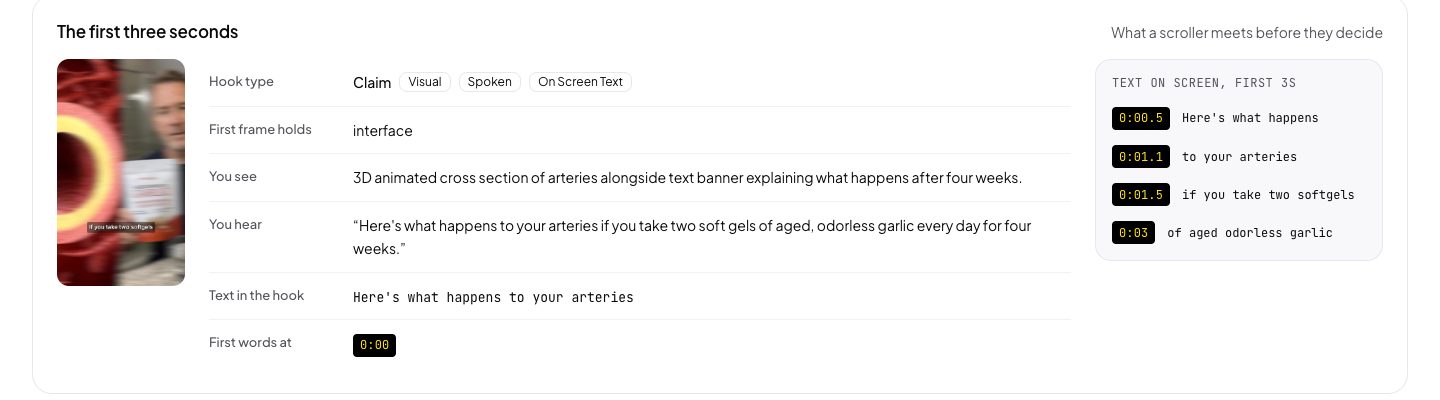
| Hook | Watch the first 3 seconds | Question on screen at 0:00, spoken at 0:01 |
| Beats | Watch it through, write each part with its start | Hook 0:00, demo 0:04, proof 0:15, ask 0:27 |
| Claims | Quote each claim with the second it is legible | 'Sleep in 10 minutes' at 0:09 |
| Offer | The deal, and the second it first appears | 20% off at 0:24, on screen for 3 s |
| Call to action | The words, and where they appear | 'Take the quiz', spoken and on screen at 0:28 |
The first 7 fields take a minute and nobody skips them. The last 5 take a person 5 to 10 minutes per ad with the pause button, so they are the fields that stay empty. And they are the only fields a brief can use: 'open on a question, demo by second 4, proof by second 15' is an instruction an editor can follow. 'Saved because it is good' is not.
How to save an ad before it disappears
Save the file and the link on the same day. The link alone is not enough.
Find the ad in the Meta Ad Library or on TikTok
Search the advertiser in the Meta Ad Library, filter to active ads, and sort by the start date. An ad that has run for weeks is an ad the brand keeps paying for, which is the best signal a public page gives.
Copy the link of the single ad
Open the ad's own entry and copy that address, not the search page. On the Meta Ad Library it has the form facebook.com/ads/library/?id= and a number.
Save the video file the same day
Download the video or screen record it. When the advertiser stops the ad or deletes it, the link can stop playing, and a swipe file of dead links is a list of things you once saw.
Write the first 7 fields at once
Brand, link, saved on, running since, platform and format, folder and tags, and why you saved it. One sentence of why, in your own words, is worth more than 5 tags.
Write the 5 watched fields before the brief
Hook, beats, claims, offer and call to action, each with its second. Do it by hand with the pause button, or paste the link into Playhead and get them back as a teardown.
Why most swipe files go unused
They hold the ads and none of what happens inside them.
A swipe file grows by one click and is read by one hour. So after 3 months it holds 300 ads, the notes stop after the tags, and the team goes back to scrolling the Ad Library because that is quicker than rewatching their own folder.
The fix is not a better folder. It is notes that can be read without playing the video. When every entry says what the hook is, where the beats fall and when the offer appears, the folder becomes a table. You can read 20 hooks in 2 minutes, see that 14 of them open on the result, and write that into a brief.
That is the part Playhead does. Paste the link of a saved ad and the teardown comes back with the hook and how it reaches the viewer, every beat with its start and length, every claim quoted with the second it is legible, the cuts, the second of the first face and the first product, and whether the ad works with the sound off. Put up to 10 ads in one set and they come back as rows of one table.
The verdict
A swipe file is worth keeping only when its notes can be read without playing the ads. Save the file and the link on the day you find an ad, file it by the job it does, and write all 12 fields. The 7 easy fields take a minute. The 5 watched fields, hook, beats, claims, offer and call to action, are the ones a brief can use, and Playhead fills them from a link, free for the first analyses and $19 a month after that.
Common questions
What is a swipe file in marketing?
A swipe file is a saved collection of other people's marketing that works, kept so that you can study its structure. Copywriters kept folders of print adverts and sales letters. An ad swipe file does the same for Meta ads, TikTok ads and reels: the hooks, offers and formats a team learns from.
Is using a swipe file the same as copying ads?
No. What you take from a swipe file is the structure: the kind of hook, the order of the beats, where the offer sits. The words, the footage and the brand stay with the advertiser who made them. Copying the creative itself is a copyright question and a bad brief.
What should I write down for each ad in a swipe file?
Write 12 fields: brand, link, saved on, running since, platform and format, folder and tags, why you saved it, and then the hook, the beats, the claims, the offer and the call to action, each with the second it happens. The last 5 are the fields a brief can use.
How do I keep a Facebook ad in my swipe file after it stops running?
Save the video file on the day you find the ad, not only the Meta Ad Library link. A link can stop playing when the advertiser stops or deletes the ad, and a file on your own drive does not depend on the advertiser.
Can AI fill in the notes of a swipe file?
Yes, for the notes that are in the video. Playhead reads an ad from its link and returns the hook, every beat with its start and length, and every claim with its second. The notes about why you saved it, and anything about spend or results, stay yours to write.