Ads that are not working break at one of five points, and each point has its own number. First, compare the sales in your shop with the sales the ad account reports: when they differ, the tracking is broken, not the ad. Low impressions point at delivery: budget, audience or an ad set still in learning. Impressions with few 3-second views point at the first seconds of the video. Views with few clicks point at the offer and the call to action. Clicks with no sales point at the landing page, the price or the checkout. Find the point where the numbers drop before you change anything, because a new video does not fix a checkout that takes 9 seconds to load, and a new audience does not fix a hook that nobody watches past.
Key takeaways
- An ad breaks at one of 5 points: tracking, delivery, the first 3 seconds, the click, or the page after the click. Each one has its own number.
- Change one thing at a time. When you change the video, the audience and the budget on the same day, you cannot know which change did it.
- In 10 product ads we read, 7 never named an offer and 6 never said what the viewer gets. Both are things you can check in your own ad in a minute.
- All 10 of those ads showed the product by 1.0 second, and 9 of them by 0.6. When your product first shows at second 8, the viewer has had 8 seconds to scroll away.
- The video explains why nobody clicks. It cannot explain why people click and do not buy. That answer is on the page after the click.
What is on this page and on no other
Every page about these products carries the same prices and the same feature lists. These are the facts this one produced itself, and how each one was made.
In 10 product ads read frame by frame, 7 named no offer, 6 never said what the viewer gets, and 4 showed no proof of any kind.
All 10 of the same ads showed the product by 1.0 second, 9 of them by 0.6 seconds, and 9 of 10 worked with the sound off.
2 of the 10 ads never showed a brand name on screen, and 2 more showed it only after 4.8 and 19.9 seconds.
Find where the numbers drop
Five points, five numbers. The first one that is wrong is the one to work on.
"My ads are not working" can mean five different things. Each one has a different cause and a different fix. So before you change anything, open your ad account and follow one ad from the top to the bottom.
| What you see | Where it breaks | What to check first |
|---|---|---|
| Sales in the shop that the ad account does not show | Tracking | The pixel on the order confirmation page, the Conversions API, and the purchase event the campaign optimises for |
| Few impressions, or the spend does not go out | Delivery | The budget, the size of the audience, and whether the ad set is still in the learning phase |
| Impressions, but few 3-second views | The first seconds | The first frame, the first words, and the second the product appears |
| Views, but few clicks | The offer and the ask | Whether the ad names what the viewer gets, a reason to act now, and what to do next |
| Clicks, but no sales | The page after the click | Load time on a phone, whether the page repeats the promise of the ad, the price, and the checkout |
Six causes that are not in the video
Check these first, because they are free to fix and a new video does not touch them.
The sales happen, and nobody records them. Before you change an ad, compare the purchases your ad account reports with the orders in your shop for the same 7 days. When the shop has 20 orders and the ad account shows 4, the ads may work and the tracking does not. Check that the pixel fires on the order confirmation page, and that the Conversions API sends the same purchase from your server.
The campaign buys the wrong thing. A campaign with the objective traffic or engagement asks Meta for people who click or react. It gets them, and they do not buy. When you want sales, the objective is sales, and the event it optimises for is a purchase.
The ad set never left learning. Meta's help page on the learning phase says an ad set needs about 50 optimisation events in 7 days to leave it. A small budget spread over five ad sets can mean that none of them gets there. Fewer ad sets with more budget each is often the whole fix.
The page does not continue the ad. The ad promises one thing and the page opens on another. The person who clicked looks for the promise, does not find it in the first screen, and leaves. Put the same words and the same picture at the top of the page.
The page is slow on a phone. Nearly every click from a video ad comes from a phone. Open your own landing page on a phone, on mobile data, and count the seconds until you can buy.
Every ad goes to people who have never heard of you. A person who sees a brand for the first time seldom buys on the first click. An ad set that shows your ad again to people who visited the page and did not buy catches the second decision. With cold traffic only, you pay for the first half of every sale and never collect the second half.
What to check in the video itself
When the drop is at the first seconds or at the click, the cause is in the file.
We counted what 10 real product ads do, from brands including AG1, WHOOP, Quince, Liquid Death and Poppi. These are ads that the brands chose to run. So the count does not say what wins. It says what shipped ads have in common, and where they leave gaps. Compare your own ad against it.
What 10 shipped product ads do, counted
Watch the first 3 seconds with the sound off
Most people see your ad muted. If the first 3 seconds do not say what this is and who it is for without sound, add words on screen.
Find the second your product first appears
In all 10 ads we read, the product was on screen by 1.0 second. If yours appears at second 8, move it forward or show it in the first frame.
Find the sentence that says what the viewer gets
Only 4 of the 10 ads said it at all. A feature is what the product has. A benefit is what the viewer has after they buy. Say the benefit, early.
Look for one reason to believe it
A review on screen, a number, a before and after, a person using the product. 4 of the 10 ads had none. Proof is the step between interest and a click.
Read the last 3 seconds
Say what to do next, and give a reason to do it now. 7 of the 10 ads named no offer. When there is no reason to act today, most people do not.
Compare your ad against one that runs
The fastest way to see what your ad leaves out is to put it beside an ad that does not.
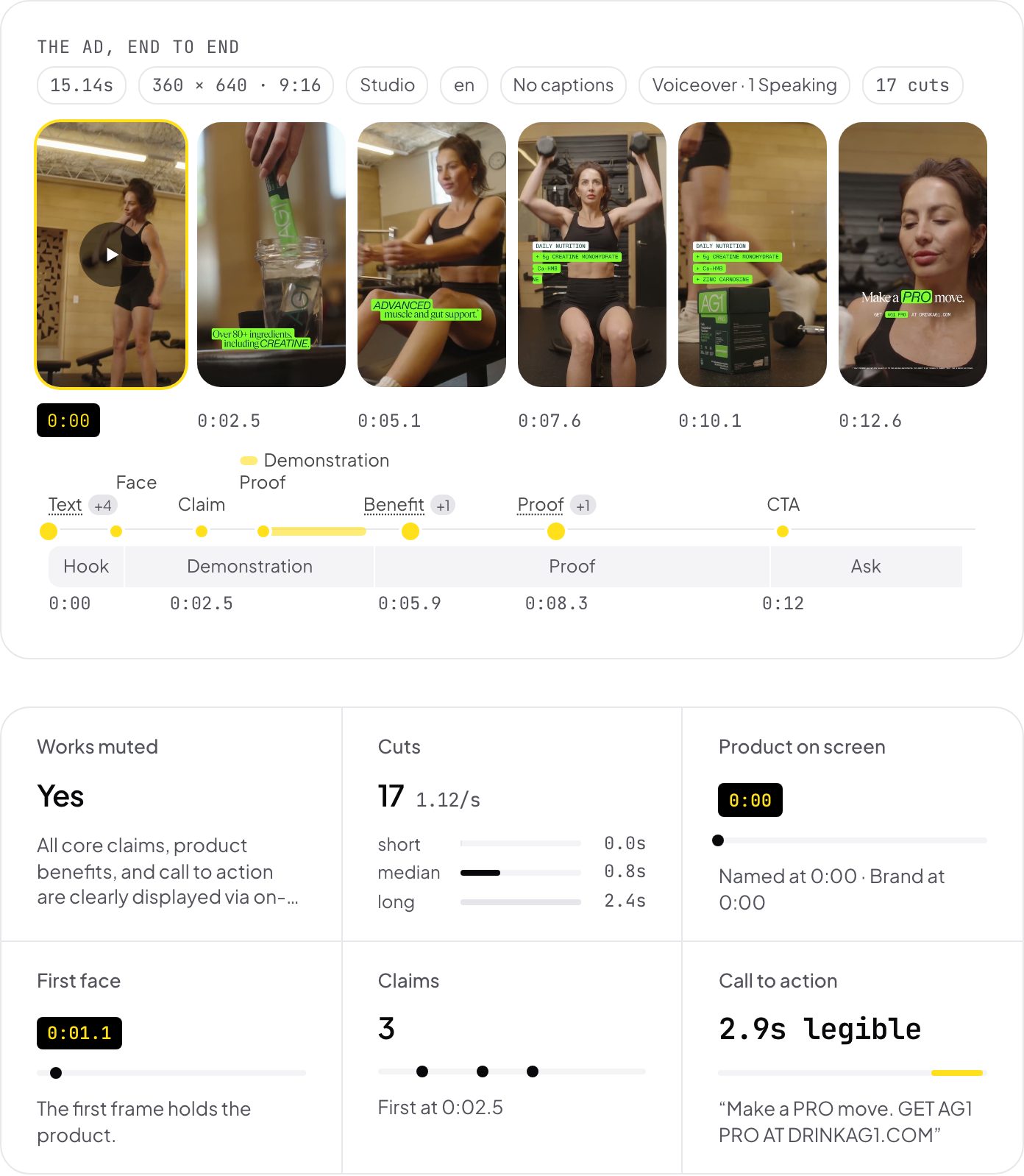
Watching your own ad does not show you what is missing, because you know what it is supposed to say. A competitor's ad that has run for months is a better reference. Find it in the Meta Ad Library, then compare the two ads on the same questions: the second the product appears, the first benefit, the proof, the offer, and the ask.
Playhead does this for you. Paste a link to your ad and a link to a competitor's ad. Each one comes back with the same fields, with the second of every moment, so you can see where your ad is different.
What goes wrong when you fix it
The ad worked, and then it stopped. Look at the frequency, which is how many times one person saw the ad on average. When the frequency rises week after week and the click rate falls with it, the same people have seen the ad too often. The fix is a new ad for the same audience, not a new audience for the same ad.
You change three things on one day. A new video, a new audience and a higher budget, and the results change. Now you do not know which change did it. Change one thing, and wait until the ad has spent enough to tell.
You turn the ad off too early. An ad that is two days old and still in learning has not told you anything yet. Decide on a spend limit before you start, and judge the ad when it reaches it.
You make a new video for a page problem. When the clicks are there and the sales are not, the video did its job. A new video brings you more of the same clicks to the same page.
You copy a winner without the reason it won. A competitor's ad works for their product, their price and their audience. Copy the structure: when the product appears, where the proof sits, how the ask is made. Do not copy the face, the joke or the discount.
The verdict
Most ads that do not sell are not broken everywhere. They break at one point, and the numbers show which one: tracked sales, impressions, 3-second views, clicks or sales. Find that point first. When it is tracking, delivery or the page after the click, a new video will not help. When it is the first seconds or the click, the cause is in the video, and the gaps are usually plain: in 10 product ads we read, 7 named no offer and 6 never said what the viewer gets. Those are two sentences you can add to your next ad this week.
Common questions
Why does my ad account show sales as 0 when my shop has orders?
Most often the tracking is broken, not the ad. Compare the orders in your shop with the purchases the ad account reports for the same 7 days. When the two numbers differ, check that the pixel fires on the order confirmation page and that the Conversions API sends each purchase from your server. Fix the tracking before you judge any ad.
Why are my ads getting clicks but no sales?
Clicks with no sales mean the ad did its job and the page after it did not. Check the landing page on a phone: how many seconds it takes to load, whether the first screen repeats the promise of the ad, whether the price is a surprise, and how many steps the checkout has. A new video brings more of the same clicks to the same page.
How do I know if the problem is the creative or the targeting?
Look at the hook rate, which is 3-second video views divided by impressions. When impressions are high and the hook rate is low, people see the ad and do not stop, so the first seconds of the video are the problem. When impressions are low, the ad is not being delivered, so the budget, the audience or the learning phase is the problem.
How long should I wait before I turn off an ad?
Wait until the ad set leaves the learning phase, which Meta says takes about 50 optimisation events in a week. Before that, the numbers change from day to day and a decision on them is a guess. Set a spend limit before you start, and judge the ad when it reaches that limit.
What should the first 3 seconds of a video ad show?
The product or the problem it solves, readable without sound. In 10 product ads we read, all 10 showed the product by 1.0 second and 9 worked with the sound off. A first frame that says what this is and who it is for does more than one that asks the viewer to wait.
Can AI tell me why my ad is not working?
An AI tool can read the video and tell you what is in it: the second the product appears, whether there is a benefit, an offer, proof and a call to action. The video holds no spend, no click rate and no sales, so the numbers from your ad account decide where to look, and the reading tells you what is in that part of the ad.