Not from a TikTok link. On 8 October 2026, ChatGPT's upload page lists documents, spreadsheets, presentations, text, images and audio, and says that an MP4 identified as video is not taken. Gemini is the one of the three that takes a video file: up to 2 GB a file and 5 minutes in total on the free plan, 1 hour on Google AI Pro. Its help pages name YouTube as the platform it reads from a link, and they name no TikTok support, so you download the TikTok first. xAI's developer guide lists image understanding for JPG and PNG, and lists video only under making and editing video. To analyze a TikTok from its link in ChatGPT, add a video connector such as Playhead: you paste the link, and the answer names the hook, every beat, the proof and the ask with their seconds.
Key takeaways
- On 8 October 2026, ChatGPT lists 6 kinds of upload and no video. An MP4 identified as video is refused even as audio.
- Gemini takes a video file of up to 2 GB: 5 minutes in total free, 1 hour on Google AI Pro. Its help pages name YouTube links, not TikTok.
- xAI's developer guide lists image understanding for JPG and PNG up to 20 MiB. All 5 of its video guides are about making or editing video.
- With a video connector, ChatGPT reads a TikTok from its link. One 12 second TikTok Shop video came back with the product at 1.47 seconds and the demonstration from 4.07.
What is on this page and on no other
Most pages on this subject repeat the same advice and the same figures. These are the facts this one produced itself, and how each one was made.
On 8 October 2026, ChatGPT's upload page lists 6 kinds of file, which are documents, spreadsheets, presentations, text, images and audio, and says that WebM and MP4 files identified as video are not supported.
The Gemini app takes a video of up to 2 GB a file, 5 minutes of video in total on the free plan and 1 hour on Google AI Pro or Ultra. Its YouTube help page is the only page of the two that names a video platform it reads from public information.
xAI's developer guide lists image understanding for JPG and PNG up to 20 MiB, and 5 of 5 of its video guides are about making or editing video: generation, image to video, reference to video, editing and extension.
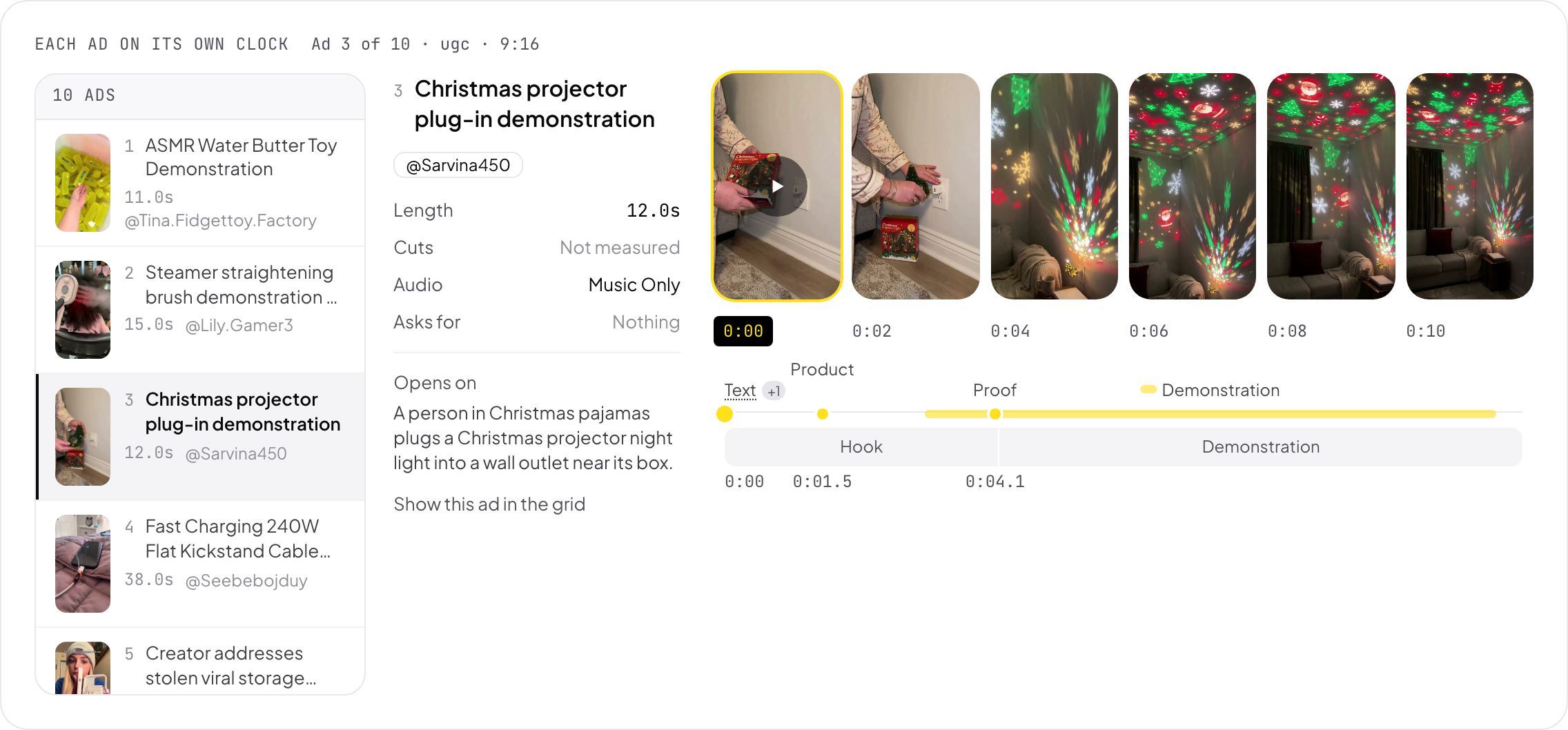
Through a video connector, a 12 second TikTok Shop video with 22.2 million views came back with text on screen at 3.0 seconds, the product at 1.47 seconds, the demonstration from 4.07 seconds, music only and no ask.
What ChatGPT, Gemini and Grok do with a TikTok
Read off each vendor's own page on 8 October 2026.
ChatGPT. Its upload page lists documents, spreadsheets, presentations, text, images and audio, and audio only on paid plans. It names no video format, and it says that a WebM or MP4 file identified as video is not taken as an audio upload either. A pasted TikTok link gives it the page around the video: the caption, the account and the hashtags.
Gemini. The Gemini app takes video files: up to 2 GB a file and 10 files in one prompt, 5 minutes of video in total on the free plan, and 1 hour on Google AI Pro or Ultra. From a link, its help names YouTube: Gemini reads public information from YouTube to find a video and understand its content. Neither page names TikTok, so for a TikTok you save the video first and upload the file.
Grok. xAI's developer guide lists image understanding, for JPG and PNG up to 20 MiB a picture. Its 5 video guides are about making and changing video: generation, image to video, reference to video, editing and extension. None is about reading a video. The Grok app itself has no page of upload formats that we could find.
Claude lists 10 document formats and 4 image formats and no video. See whether Claude can watch TikTok videos for that one.
| ChatGPT | Gemini app | Grok (xAI docs) | ChatGPT or Claude with a video connector | |
|---|---|---|---|---|
| Takes a video file | No, MP4 as video is refused | Yes: 2 GB a file, 5 min free, 1 h on AI Pro | Not in the docs: images only | Yes, a file of your own |
| Reads a TikTok from its link | The caption only | Not named. YouTube links are | Not in the docs | Yes |
| Names the second of each part | No | From an upload, when you ask | No | Yes, to a hundredth of a second |
| Reads a set of TikToks side by side | No | Up to 10 files, 5 min in total free | No | Up to 10 as one set, on one clock |
| Works in the phone app | Images and files | Yes | Not in the docs | Yes, the connector follows the account |
Video platforms each assistant names for watching from a link, 8 October 2026
What a TikTok looks like when the assistant can see it
A 12 second TikTok Shop video with 22.2 million views, read on 8 October 2026.
This is one of the 19 videos in our count of TikTok Shop hooks. It sells a Christmas projector that plugs into a wall socket.
The hook, 0:00 to 0:04. A person in Christmas pajamas plugs the projector in beside its box. The product is first in view at 1.47 seconds, and the text "Christmas Projector Light" appears at 3.0 seconds.
The demonstration, 0:04 to 0:12. The room goes dark and the walls fill with stars, snowflakes and Santa shapes. The demonstration is the payoff, and it runs to the last frame.
What it leaves out. No spoken sentence, music only, no price, no offer and no ask. It works with the sound off.
From the link alone, an assistant would see a caption of four hashtags and nothing of this.
How to analyze a TikTok in ChatGPT or Gemini
Two routes: a connector in ChatGPT, or an upload in Gemini.
1. In ChatGPT, add a video connector
Turn on Developer mode under Settings, Connectors, Advanced. Then add a connector with the URL https://mcp.tryplayhead.com/mcp and sign in with a Playhead account. No API key is needed.
2. Paste the TikTok link and ask for the parts
Ask for parts by name: "Read this TikTok: the first frame, the hook and when it ends, when the product shows, the proof, the delivery and the ask, with seconds." A list of parts gets a list of answers.
3. In Gemini, save the TikTok first
Gemini takes the file and not the TikTok link. Save the video from TikTok where the creator allows it, then upload it. The free plan takes 5 minutes of video in total, which is 15 TikToks of 20 seconds.
4. Ask for seconds, then check one
Ask for the second of each part and open the video at one of them. When the picture at that second does not match, ask again for that part alone.
5. Compare 3, not 1
Ask for the same parts for 3 top videos of your niche, then ask which parts all 3 share. That is the format to film with your own product.
The verdict
ChatGPT does not analyze a TikTok on its own: on 8 October 2026 it lists no video upload and refuses an MP4 as video. Gemini takes 5 minutes of uploaded video for free, but its help names YouTube links and not TikTok, so you download the TikTok first. xAI's developer guide lists images and 5 guides for making video, none for reading one. A video connector closes the gap in ChatGPT and Claude: you paste the TikTok link, and the answer names the hook, every beat, the proof and the ask with their seconds.
Common questions
Can ChatGPT analyze TikTok videos?
Not on its own. On 8 October 2026, ChatGPT's upload page lists no video format and refuses an MP4 identified as video, and a TikTok link gives it only the caption. With a video connector added in Developer mode, ChatGPT reads the TikTok from its link and answers with seconds.
Can Gemini analyze TikTok videos?
From an uploaded file, yes: the Gemini app takes up to 2 GB a file and 5 minutes of video in total free, 1 hour on Google AI Pro. Its help pages name YouTube links and not TikTok links, so you save the TikTok first and upload it.
Can Grok analyze TikTok videos?
xAI's developer guide lists image understanding for JPG and PNG up to 20 MiB, and its 5 video guides are about making and editing video. We found no page that lists video upload for the Grok app on 8 October 2026.
Which AI is best for analyzing TikTok videos?
Of the 3 assistants, only Gemini takes a video file, after you download the TikTok. For a link, ChatGPT and Claude with a video connector read the TikTok directly and return each part with its second, and a set of up to 10 videos can be read side by side.
Why does ChatGPT answer about a TikTok when it cannot see it?
ChatGPT reads the page behind the link: the caption, the account and the hashtags. An answer from those is an answer about the caption. Look for a tool call in the reply. When there is none, the video was not read.
Can ChatGPT compare several TikToks?
With a video connector, yes. Paste up to 10 links in one message and ask for the same parts for each one, then ask which parts all of them share. Without one, ChatGPT sees only the captions.